Select Payout Account
This page details how the user can connect a payout account to their Safepay Nordic Account if not already done. This flow is the same for websites and iOS and Android apps. It assumes that you already have credentials to successfully call Safepay Nordic APIs and have subscribed to notifications using Webhooks API.
{SAFEPAY_ACCOUNT_ID} is the user's Safepay Account Id, which you obtain from the Connect flow.
How it works
Sunshine scenario is expected for the majority of the time.
- When a user wants to add or change the payout account for trades, request your backend services to create a redirect url using Safepay Nordic API.
- Re-direct user to Safepay Nordic Frontend using https uri.
- Selects bank and signs in to bank and selects bank account in Safepay Nordic Frontend
- Your backend services reads the selected bank accounts and adds the chosen one to the user.
- Meanwhile user returns to your application (using re-direct or switching apps) and sees the success screen.
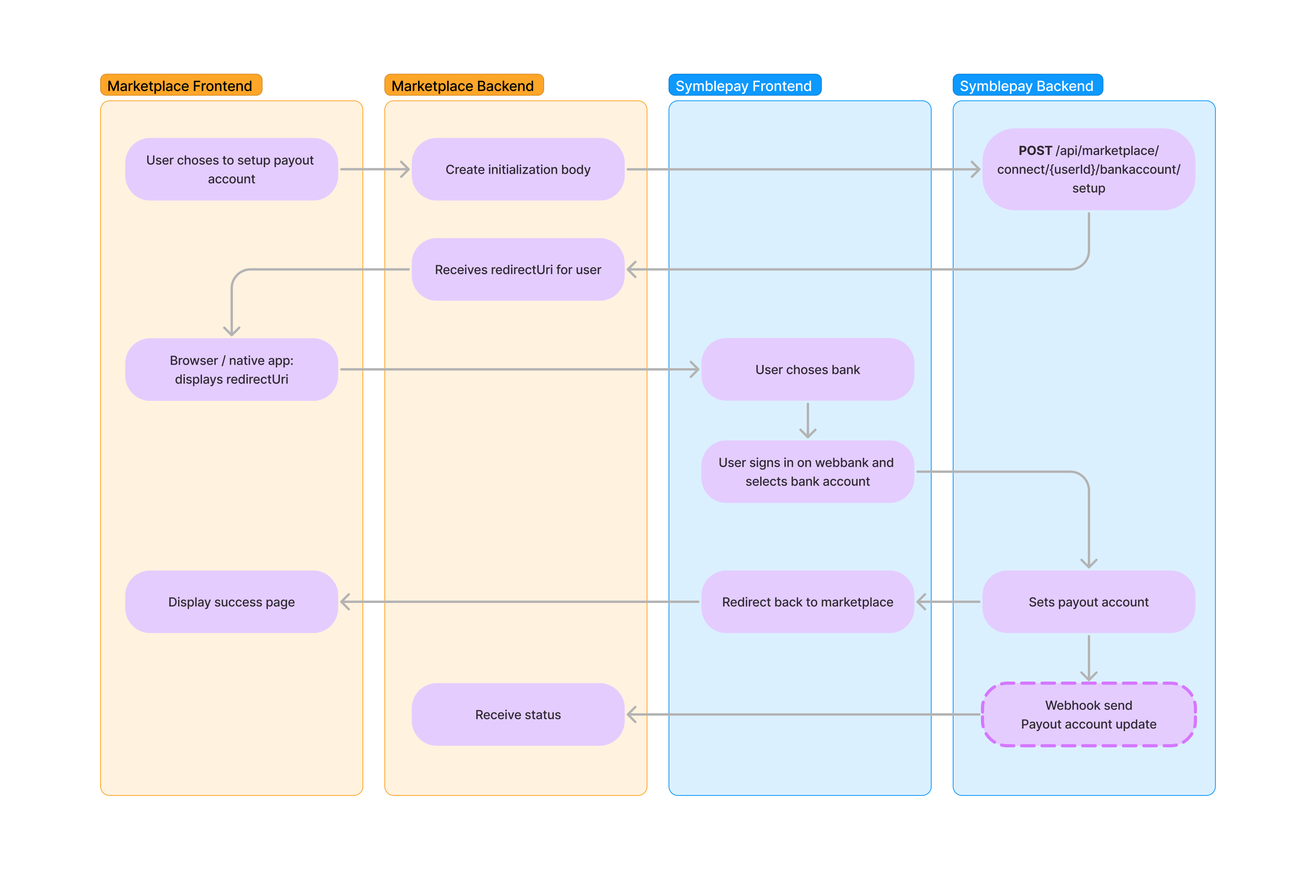
1. List available banks
Get the banks available for bank account onboarding. Use a returned bankId in the next step.
curl https://api.safepaynordic.dk/v2/users/{SAFEPAY_ACCOUNT_ID}/banks \
  -X GET \
  -H 'Authorization: Bearer {API_TOKEN}' \
  -H 'Content-Type: application/json'
{
    "banks": [
        {
            "bankId": "nordea",
            "name": "Nordea",
            "bankCentral": "2000"
        }
    ]
}
2. Initiate bank account selection
curl https://api.safepaynordic.dk/v2/users/{SAFEPAY_ACCOUNT_ID}/bank-accounts/initialize \
  -X POST \
  -H 'Authorization: Bearer {API_TOKEN}' \
  -H 'Content-Type: application/json' \
  -d '{
        "bankId": "nordea",
        "returnUrl": "{RETURN_URL}"
      }'
{
    "url": "https://mitsafepay.dk/l/b3a1f9c2"
}
Send your users to the returned url in a browser or In-App browser on Android or iOS. After bank account validation the user is redirected back to your returnUrl.
3. Read the selected bank accounts
After the user returns, read the accounts they selected. The results are temporary and only available for a short period.
curl https://api.safepaynordic.dk/v2/users/{SAFEPAY_ACCOUNT_ID}/bank-accounts/initialize \
  -X GET \
  -H 'Authorization: Bearer {API_TOKEN}' \
  -H 'Content-Type: application/json'
{
    "bankId": "nordea",
    "bankName": "Nordea",
    "bankCentral": "2000",
    "bankAccounts": [
        {
            "bankAccountId": "a1b2c3d4-5e6f-4a7b-8c9d-0e1f2a3b4c5d",
            "name": "Salary account",
            "ownerName": "John Doe",
            "bban": "20000123456789",
            "iban": "DK5000400440116243",
            "currency": "DKK"
        }
    ]
}
4. Add the chosen bank account
Add the selected account using its bankAccountId. The first bank account added to a Safepay Account is marked as default.
curl https://api.safepaynordic.dk/v2/users/{SAFEPAY_ACCOUNT_ID}/bank-accounts/add \
  -X POST \
  -H 'Authorization: Bearer {API_TOKEN}' \
  -H 'Content-Type: application/json' \
  -d '{
        "bankId": "nordea",
        "bankAccountId": "a1b2c3d4-5e6f-4a7b-8c9d-0e1f2a3b4c5d"
      }'
To change which account is used for payout, set it as default:
curl https://api.safepaynordic.dk/v2/users/{SAFEPAY_ACCOUNT_ID}/bank-accounts/set-default \
  -X POST \
  -H 'Authorization: Bearer {API_TOKEN}' \
  -H 'Content-Type: application/json' \
  -d '{
        "bankId": "nordea",
        "bankAccountId": "a1b2c3d4-5e6f-4a7b-8c9d-0e1f2a3b4c5d"
      }'
Wait for the flow to be finished
Wait for the user to be redirected back to your returnUrl.
https://marketplace.dk/return-url
Receive webhook
A webhook is also sent when a new bank account is connected to the user's account.
{
    "eventName": "user.bankaccount.connected",
    "eventDate": "2024-02-16T10:36:20+01:00",
    "webhookId": "ed3325d8-b379-444a-9cc1-7d119efefbea",
    "safepayAccountId": "f6c4a43f-682e-4559-b8d1-11a63afd134a",
    "connections": [
        {
            "referenceId": "your-user-id",
            "connected": "2024-02-16T10:36:20+01:00"
        }
    ]
}